


How to Use QR Codes at Your Wedding to Collect Guest Photos
Your photographer captures the big moments — the ceremony, the first dance, the speeches, the group photos.
But your guests capture something different.
The laughter at their table. A funny selfie with an old friend. Your grandmother dancing. A spontaneous moment while everyone else is looking the other way.
These are the moments that make your event feel complete.
With Addmoments, guests can scan a QR code and upload their photos and videos directly to your private event album — no app download and no complicated process.
But there is one important question:
How do you encourage your guests to actually scan the QR code and share their photos?
Here are some simple and creative ways to make photo sharing part of the event itself.
1. Make Your QR Code Easy to See
The first step is simple: guests need to notice your QR code.
There are several ways you can prepare QR cards and welcome boards for your event.
A. Order QR Cards and Welcome Boards
You can order professionally designed QR cards and welcome boards directly from Addmoments.
Your unique event QR code is included in the design, so they arrive ready to use at your celebration.
B. Personalize Our Canva Templates
Want to create something yourself?
You can use our free Canva templates and personalize them to match your event.
Change the names, text, fonts or other elements to create a design that fits naturally with your wedding style.
Once you’re happy with it, simply download the design and print it.
C. Create Your Own Design
If you already have your own wedding stationery or event design, you don’t need to start again.
Simply download your unique Addmoments QR code from your event page and add it to your own design.
This way, you can keep everything consistent with your wedding style while still giving guests an easy way to share their photos.
2. Place QR Codes Where Guests Will Notice Them
Having one QR code hidden somewhere at the venue probably isn’t enough.
Think about where your guests naturally spend their time throughout the event.
Table Centerpieces and Place Cards
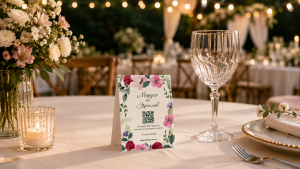
Place a small QR card on each guest table or incorporate the QR code into your table centerpiece.
Guests spend plenty of time at their tables, giving them multiple opportunities to notice the QR code, scan it and upload their photos.
Welcome Signage at the Entrance
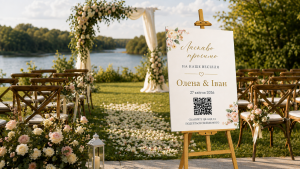
The entrance is one of the best places to introduce Addmoments.
Add the QR code to your welcome board together with a simple message such as:
“Scan the QR code and help us create our wedding album!”
Guests discover the idea as soon as they arrive and already know where to share their photos later.
Wedding Program or Menu Card
Already printing wedding programs or menus?
Add your QR code there too.
It doesn’t need to dominate the design. A small QR code with a short call to action is enough to remind guests throughout the celebration.
Cake Table or Bar Area
Think about places where guests naturally stop, wait or gather.
The cake table and bar are perfect examples.
A small QR card in these areas gives guests another opportunity to scan the code and share their moments.
3. Don’t Just Display It — Announce It
Sometimes the simplest method is also one of the most effective.
Tell your guests about it.
Ask your DJ or host to make a short announcement during the event:
“Don’t forget to share the photos and videos you’re taking tonight! Just scan the Addmoments QR code on your table and add your favorite moments to the album.”
A short announcement reminds everyone what the QR cards are for and encourages guests who haven’t uploaded anything yet.
Timing matters too. Consider making the announcement once guests have already taken some photos — for example, after dinner or when the party begins.
4. Turn Photo Sharing into a Game
Want more uploads?
Make it fun.
Instead of simply asking guests to upload photos, give them small challenges throughout the event.
Play Addmoments Bingo
Create a wedding bingo card with fun challenges such as:
- Take a selfie with someone you’ve just met.
- Photograph someone dancing.
- Take a funny group photo.
- Leave a written or audio message.
- Upload a photo to Addmoments.
Suddenly, sharing photos isn’t another task — it’s part of the entertainment.
You can even challenge different tables or groups of friends to complete their bingo card first.
And the result?
More photos, more spontaneous moments and a much more interesting wedding album.
5. Reward the Best Photos
A little motivation can go a long way.
Tell your guests that you’ll choose your favorite uploaded photo at the end of the evening.
The prize doesn’t have to be expensive. It could be chocolate, a small gift, a funny wedding prize or a personalized souvenir.
You can also create different categories:
- Best Photo
- Funniest Photo
- Best Selfie
- Best Dance Floor Moment
- Most Unexpected Photo
Guests will start looking for moments worth capturing instead of only taking the usual posed photos.
It creates a little friendly competition — and gives you an even better collection of memories.
6. Encourage Guests to Upload During the Event
One common mistake is waiting until the event is over to ask everyone for their photos.
By then, people are travelling home, returning to work or simply forgetting about the pictures sitting in their camera roll.
Encourage guests to upload while the celebration is happening.
The QR card is already in front of them. Their phone is already in their hand. And the photos they just took are ready to upload.
Make sharing part of the experience rather than something guests need to remember tomorrow.
One QR Code, Hundreds of Different Perspectives
Your wedding isn’t experienced through just one camera.
Every guest sees something different.
One person captures the first dance.
Someone else catches your parents laughing.
Another guest photographs the table decorations you spent months choosing.
And somewhere in the room, someone has probably taken the funniest photo of the entire evening.
With Addmoments, all of those perspectives can come together in one private event album.
Place your QR codes where guests can see them. Mention them during the celebration. Turn uploading into a game. Give people a little motivation.
Then let your guests do what they already love doing:
Capture the moment. Scan. Upload. Add the moment.